Meal X-Ray
How Meal X-Ray works
You take a photo. The app estimates what's on the plate and how much of it, then compares the meal with what is recommended for one meal. Here is each step, and what a photo can and can't tell.
1. A photo of the plate, a drink or a menu
Take a photo or pick one from your library. The first time, the app asks before sending anything: the photo goes to our server and to an AI service only to analyse the meal, and is not stored on our server.
2. The result in seconds
On top, one short line about the meal. Below, the levels, and the items the app saw on the plate. If the photo leaves a doubt, like a filling, a sauce or a size, you get one quick question and the result updates.
3. Low, Medium or High, for one meal
The AI estimates amounts; the levels are set by fixed rules in the app, not by the AI. Each meal is compared with about a third of a day, from the daily references of the World Health Organization and of EU food labelling.
| What | Read as |
|---|---|
| Salt, added sugar, saturated fat | Less is better |
| Fruit and veg, whole grains | More is better |
| Processed and red meat | Shown when the meal contains them |
| Energy, carbohydrate, total fat | Compared with about a third of a day's label reference |
"How we assess", in the app's settings and at the end of every result, lists every threshold and links to its source.
4. Where it may come from, and a swap
Each level points to the part of the meal it may come from, for example the cheese, the bread or the sauce. When something comes out High, you get up to two swap ideas: a lighter version, a smaller portion, or one of two similar items.
5. Your portion, your focus, what you avoid
- Portion: tell the app how much you'll eat, from a half to double. The levels follow.
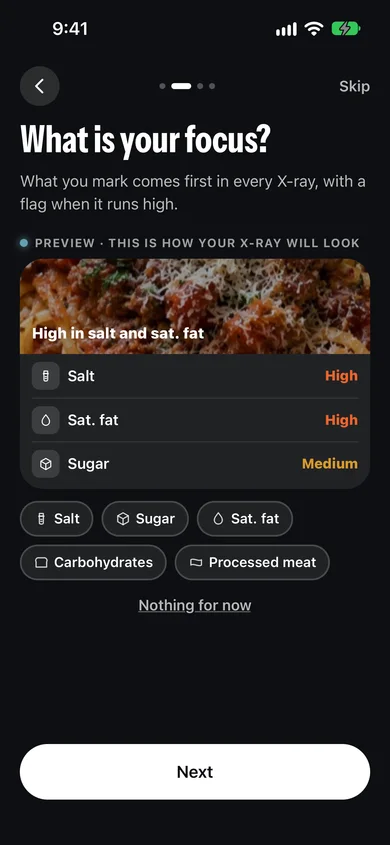
- Your focus: salt, sugar, saturated fat, carbs or processed meat comes first in every X-ray.
- What you avoid: mark gluten, milk, egg, nuts, seafood or your own words. When a dish often carries one, you see a "may contain" note as a reminder to ask. A photo can't detect allergens: always ask whoever made the food.
- Your week: a view of your X-rays over the last 7 days.
What a photo can't show
Salt dissolved in a sauce, the oil in the pan, the exact size of a portion: a photo can't see everything. Every result is an estimate and can be wrong, which is why you can correct what the app saw with "Not right?". For changes to what you eat for a health reason, talk to your doctor or a dietitian.
Free and Pro
Your first 2 analyses are free. Meal X-Ray Pro is a monthly or yearly subscription; the yearly plan starts with a 3-day free trial for new subscribers. Fair use: up to 150 analyses a month and 10 a day. Prices are shown in the App Store for your country.
Ready to try it on your next meal?